Features
What's New in Vesence: May 2026

Everywhere the Work Lives
Professional work doesn't live in one application. A matter is a Teams thread, a calendar, a SharePoint site, a workbook, and a hundred emails, and until now, an assistant that only saw some of those could only do some of the work.
May went into closing that gap. Six things stand out.
1 — Microsoft Teams Integration
Vesence now works inside your Teams conversations. Ask it to catch you up on a deal thread, find the message where terms changed, or draft the update your team is waiting for: it reads the conversation the way you would.
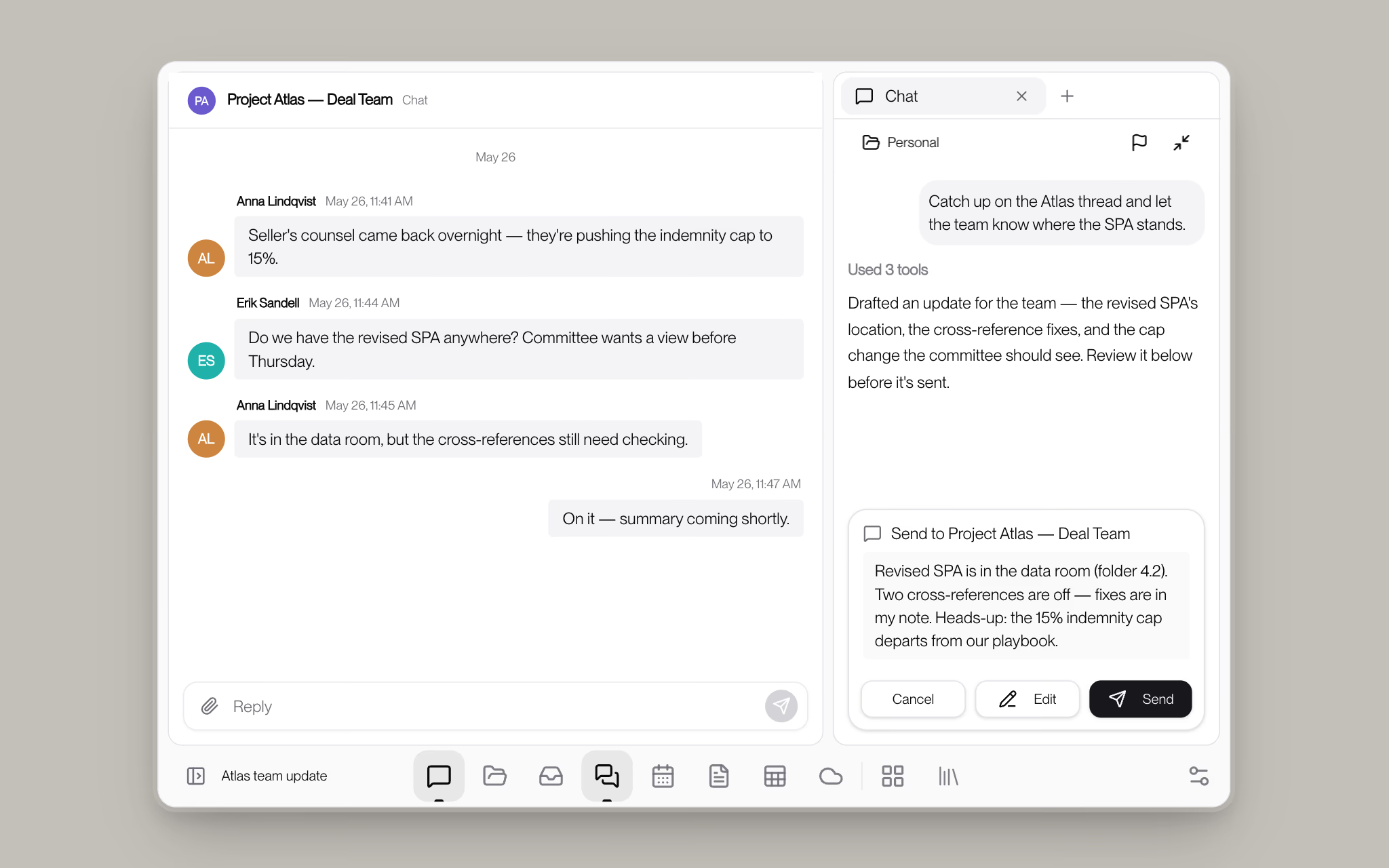
Nothing is ever posted on its own. When the agent has a message ready, it appears as a draft for your approval: send it as-is, edit it first, or decline. You stay the sender; Vesence does the typing.
2 — Outlook Calendar
Scheduling is the classic five-email problem. Vesence can now see your calendar, check when colleagues are free, and prepare the invite, all from a sentence like "find an hour with Sara and Erik this week for the signing call."

The invite arrives as a proposal, not a fait accompli: you review the time, the attendees, and the agenda before anything lands in anyone's inbox.
3 — A Much More Powerful SharePoint Integration
SharePoint is where firms keep everything, and in May the integration grew into that role. Agents can now run deep research across your sites, sweeping entire libraries for the precedents, clauses, or matter files you asked about, instead of skimming one folder.

You can also browse and hand-pick files yourself in a fast, familiar file browser, and, the other half of the loop, agents can push work back: the finished summary, the marked-up agreement, the research memo, saved to the right folder in SharePoint where your team expects to find it.
4 — Spreadsheets You Can Actually Edit
Spreadsheets in Vesence stopped being read-only pictures. There is now a real formula bar, a formatting toolbar, conditional formatting, and zoom, so when an agent touches a workbook, you can step in and work the cells yourself instead of round-tripping through Excel.

This is the foundation that grows into the full editing experience later in the summer. See Introducing Vesence Editor.
5 — Agents That Keep Going
Long matters used to hit a wall: after enough documents and enough steps, an agent would simply run out of room to think. Vesence now reorganizes its working context automatically mid-task, so a session can work through a disclosure bundle or a diligence folder end to end.

You'll see it as a quiet "context organized" line in the chat. What it means is that the size of the job no longer decides whether the agent can finish it.
6 — New Models, Hosted in the EU
May also brought the newest frontier models into Vesence, including Claude Opus 4.8 and GPT-5.5, with GPT-5.5 served from Azure's EU regions in Sweden and Poland for organizations with European data-residency requirements.

For organizations that want to go further, Vesence can now route to your own inference provider, for example Advania in Sweden, so the models run where your policies say they should.
What This Adds Up To
After May, Vesence sits across your whole Microsoft estate (mail, chat, calendar, files, and workbooks) rather than beside it. The same assistant that redlines your SPA can brief your deal team, book the signing call, and file the result where it belongs.
Getting Started
Everything above is available today. Book a demo or request an invite.